






Imagine a photograph that exhales. A single frame that blinks, sighs, and then sashays off the page into a tiny loop of motion — a falling leaf that lingers in midair, a dog that blinks just once and looks wiser, a distant train that becomes a heartbeat. That's the sweet spot of frame-by-frame animation: turning static into suggestive, the frozen into a story you can watch in a coffee break.
If you're curious about where to begin, Dreamina makes this playful and fast. Start by feeding a favorite still into an AI photo generator to explore texture, mood, and alternate lighting. From there you can plan a few frames, sketch micro-movements, and stitch them into a short loop that reads like a dream. Below are creative approaches, technical shortcuts, and a short three-step Dreamina process so you can create subtly moving daydreams from photos you already love.
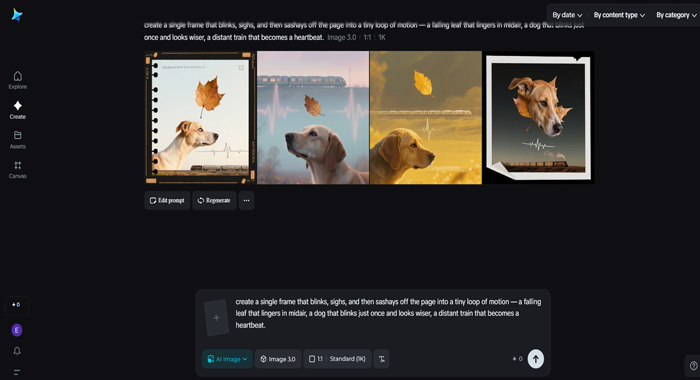
The smallest motion that makes a picture breathe
You don't need 24 frames per second to convince someone something moved. Often, one deliberate change is enough.
Pick one: the easier the option, the clearer the illusion. The remainder is left up to the viewer's imagination thanks to micro-movements.
Techniques & resources: How to simulate natural motion
You can create realistic motion using surprisingly easy methods:
Each technique trades time for effect. Choose the one that matches your patience and the platform you're optimizing for.
Story scaffolding: tiny arcs that loop well
A loop still needs a micro-plot. Set, shift, and return (or transform) are the three beats to think in.
Seamless loops are soothing; transformative loops feel like a quick story. Both are valid — pick the sensation you want.
Visual rhythm and the soundless soundtrack
Even silent loops have rhythm. You can design cadence visually: the pace of falling leaves, the blink interval, or the ebb of light. To the eye, these selections resemble a soundtrack. Consider pairing your loop with a short sound cue when sharing (a single piano note, a soft whoosh) — it deepens the illusion without stealing attention.
Reusable assets and motion libraries
If you plan to make multiple loops, build a small library: cloud wiggles, candle flicks, leaf falls. Reusing assets speeds production and gives your work stylistic cohesion. Keep each motion subtle and scalable — a leaf fall that works on a phone screen should also read on a larger canvas.
Composition hacks for animation-friendly photos
Some photos are easier to animate than others. When choosing or framing a still, prefer:
If you're starting with an existing photo that's busy, crop for clarity. Animation rewards bold, readable silhouettes.
Go to Dreamina and create an in-depth text prompt that outlines the scene, the micro-motion you desire, and the mood. For instance: "An empty street at sunset with a lone orange streetlight; bring to life a light newspaper blowing down the sidewalk and a distant window light flashing once. Warm color palette, gentle grain, movie shallow depth of field." Telling the motion and tone assists you in producing foundation images and variants that match your loop concept.

Step 2: Set parameters and produce
Choose a Dreamina model that values texture and detail, choose between 1k for quick iterations or 2k for more quality, and specify the aspect ratio for the output you want (wide for headers, square for social). After that, click Dreamina's icon to create a variety of versions that may be used as backdrop plates or frame bases.

Step 3: Personalize and download
Use Dreamina's tools to fine-tune your generated plates — inpaint to get rid of distracting objects, expand to open up the scene more so that looping is smooth, remove to get rid of artifacts, and retouch to balance color frame to frame. Once your base frames are good to you, click the Download icon to save them and take them into your animation pipeline.

Crafting loops for different platforms
Different platforms reward different lengths and formats:
Keep file size in mind. GIFs are widely supported but heavy; exported MP4s or WebMs give better quality at smaller sizes.
Polishing for perfection: anti-flick and edge cleanup
Small artifacts ruin the illusion: flickering edges, haloed masks, or color shifts between frames. Use a free AI art generator to create these:
A unified texture layer (soft grain or paper noise) often makes the loop feel intentional and handcrafted.
Iterate like a short-form director
Make variations fast, then pick the strongest. Try different speeds, a blink earlier or later, or a whisk of wind in the opposite direction. The best loop often appears after three or four tries — small changes reveal stronger narrative choices.
When to call a logo and when to stay invisible
If your animations are part of a brand or series, consider a small, discreet mark to tie them together. Dreamina's AI logo generator can suggest tiny emblems that read cleanly at corner-scale: a dot, a curved line, a simple glyph that signals the series. Keep it subtle so it doesn't fight the image.

Collaboration and community prompts
Share a still and invite others to animate it — a creative prompt can spark dozens of micro-interpretations. Host a "one-frame, one-loop" jam where contributors animate a single element each. The variations teach you which micro-motions resonate most with viewers.
Closing loop: why moving stills matter
Tiny animations transform how we remember images. They give a single photograph a private life — a quiet motion that reclaims attention in a crowded feed. With Dreamina's help you can ideate with generated bases, refine with smart retouching, and export polished loops that feel like daydreams you can press play on.
Start small: pick one favorite still, decide on one convincing micro-movement, and see how much story fits into three seconds. When you loop it right, viewers come back not to watch what happens next, but to savor the moment you gave motion.
ARTICLES CLOUD
LATEST TECHNOLOGY ARTICLES
LATEST TECHNOLOGY NEWS
Our Youtube Channels

Nettv4u

Sillaakki Dumma

Crazy Masala Food

Cinemakkaran

Thandora

AskMirchi
Copyright © 2026 NetTV4u.com


















 Home
Home